Help Center
Everything you need to get the most out of FlashBrief
FlashBrief is your personal AI news anchor. You tell us which topics you care about and assign each one to specific days of your week. Every day, we search hundreds of news sources for that day's topic, write a professional briefing, and deliver it as a podcast episode straight to your favorite podcast app. Think of it as having a dedicated newsroom that works just for you — one focused subject per day, in about 5 to 7 minutes.
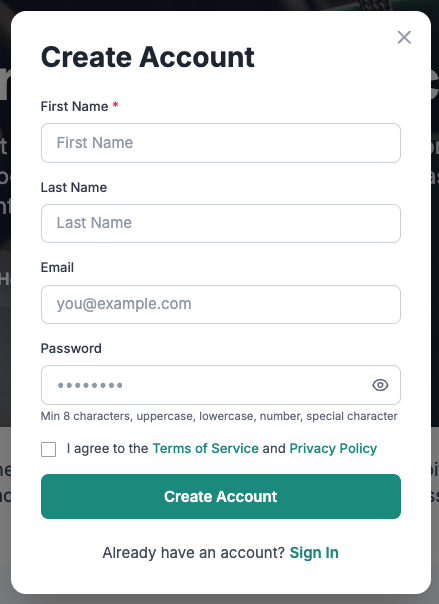
Head to flashbrief.app and click "Start Your Free Trial." You'll need to enter your name, email, and choose a password. We'll send a verification code to your email — enter that code, and you're in. The whole process takes about a minute.
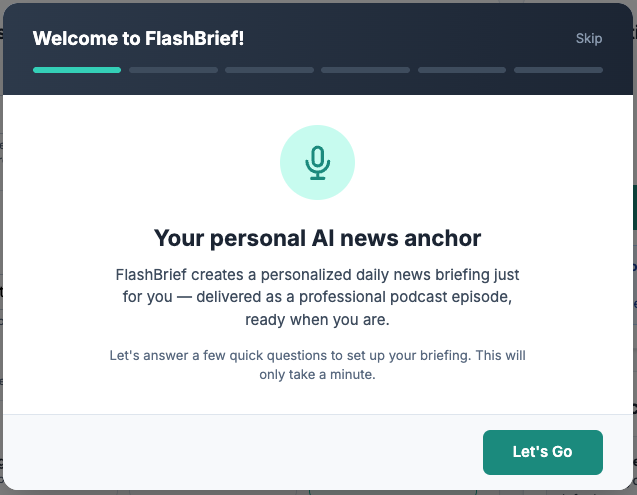
Right after you verify your email, you'll be guided through a quick setup wizard. You'll choose your news topics and assign them to the days of your week, pick a voice, select background music, and set your delivery time. Once you finish the wizard, your very first episode starts generating immediately — it'll be ready in your podcast app within about 10 minutes.
Your free trial gives you 5 episodes — one each day for five days. No credit card required — you'll only be asked to pay if you decide to upgrade.
The best topics are specific enough to generate focused coverage, but broad enough that there's regular news about them. For example, "Artificial Intelligence" works great because there's fresh news every day. "Egyptian politics" or "Renewable energy in Europe" also work well. When you type in a topic, FlashBrief checks how much recent coverage is available and gives you a confidence rating — green means great coverage, amber means it'll work but some days might be thin, and red means you might want to try something different.
Tip: If you care about a specific region, include it in your topic. "AI in Europe" will give you very different results from just "AI." Similarly, "tech startups in the Middle East" is more focused than just "tech startups."
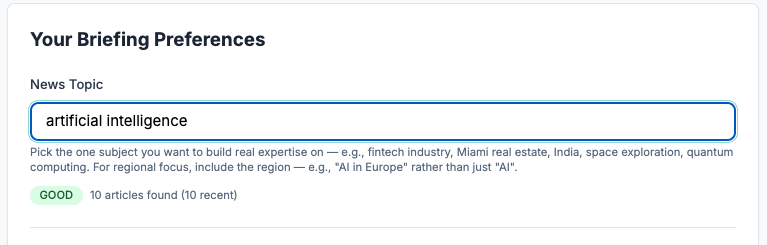
When you enter a topic, we search current news sources to see how much coverage exists:
- Good (green): Plenty of recent articles. You'll get fresh, diverse briefings every day.
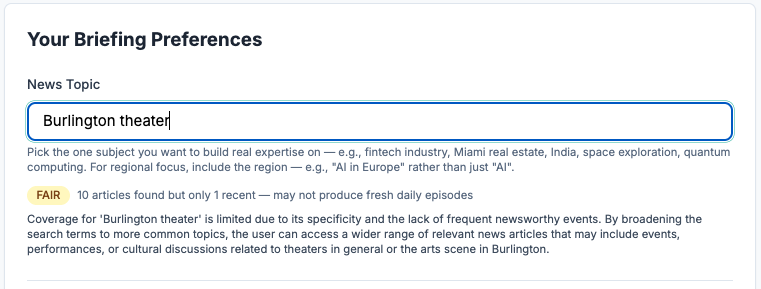
- Fair (amber): Some coverage, but not as much. Your briefings will still be good, but on quieter news days the content might overlap with previous episodes.
- Poor (red): Very little recent coverage. We'll suggest alternative topics that might work better. You can still save a "poor" topic — we won't stop you — but your experience might not be as strong.
Absolutely. Go to your dashboard and you'll see your topic schedule — each topic assigned to specific days of the week. You can change any topic, add new ones, remove ones you no longer need, or rearrange which days each topic gets. Just make sure to click Save when you're done. Changes take effect starting with your next scheduled episode. The number of topics you can have depends on your plan: Premium and Trial users can have up to 7 topics (one per day), Standard users can have up to 4, and Lite users up to 2. You can also keep things simple with a single topic across all your delivery days — it's entirely up to you.
Here are some examples of topics that work really well: "Egypt" or "Egyptian news," "AI and machine learning," "Climate change policy," "European Union politics," "Cryptocurrency markets," "Space exploration," "Global health." Topics that are less ideal: very niche academic subjects with little media coverage, single-company topics (like just "Apple" — try "Apple and tech industry" instead), or topics that are mostly opinion-based rather than news-driven.
If your topic gets a "Fair" or "Poor" rating, FlashBrief will suggest up to 3 alternatives that have stronger news coverage. These suggestions are related to what you typed but slightly broadened or reframed. You're never required to accept a suggestion — they're just there to help. Think of them as a friendly nudge: "Hey, if you broadened this a little, you'd get even better briefings."
FlashBrief delivers your episodes through a personal podcast link (technically called an RSS feed, if you're curious). You add this link to any podcast app — Apple Podcasts, Overcast, Pocket Casts, or any other app that supports podcast subscriptions — and your episodes show up automatically, just like any other podcast you follow.
After your first episode is generated, your podcast link appears on your dashboard. Look for the "Your Podcast Feed" section — there's a button to copy the link, and quick-add buttons for popular podcast apps.
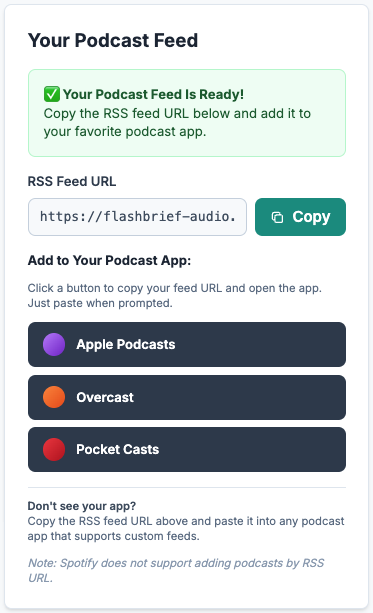
Here's how to do it step by step:
- Copy your podcast link from the FlashBrief dashboard (tap the "Copy" button).
- Open Apple Podcasts on your iPhone or iPad.
- Tap the Search tab at the bottom.
- Tap the search bar at the top of the screen.
- Paste your podcast link into the search bar and tap "Go" or press Enter.
- Apple Podcasts will find your FlashBrief feed. Tap "Subscribe" or "Follow."
- That's it! Your episodes will now appear in your Library automatically.
On Mac, open Apple Podcasts, go to File > Add a Show by URL, paste your link, and click Follow.
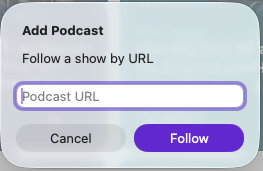
In Overcast:
- Copy your podcast link from the FlashBrief dashboard.
- Open Overcast and tap the "+" button.
- Tap "Add URL."
- Paste your podcast link and tap "Add."
Your FlashBrief episodes will appear in your Overcast library.
In Pocket Casts:
- Copy your podcast link from the FlashBrief dashboard.
- Open Pocket Casts and tap "Search."
- Paste your podcast link into the search bar.
- Tap the FlashBrief result to subscribe.
Spotify doesn't let you paste in a podcast feed URL the way other apps do. But there's a free workaround that takes about 5 minutes: you submit your feed through Spotify for Podcasters, then follow your own show.
Here's how:
- Go to podcasters.spotify.com and create a free account (or sign in with your existing Spotify account).
- When it asks you to add a podcast, choose "I have a podcast" (or the option for an existing RSS feed).
- Paste your FlashBrief RSS feed URL. You can find this on your Dashboard under "Your Podcast Feed."
- Give your show a name (something like "My FlashBrief" or just "FlashBrief").
- Submit the feed. Spotify will send a verification email to the address on your FlashBrief account — check your inbox (and spam folder) and click the link to confirm ownership.
- After verification, wait for Spotify to approve your show. This usually takes a few hours, but can take up to a day or two.
- Once approved, search for your show name in the Spotify app and follow it.
- New episodes will now appear in your Spotify library automatically, just like any other podcast.
A few things to know:
- Your feed is private to you. Nobody else will find or subscribe to your show unless you share the link.
- Spotify for Podcasters is designed for people who publish podcasts, but you don't need to share yours with anyone. You're just using it to get your personal feed into Spotify.
- If your episodes don't appear right away after approval, give it a few hours. Spotify can be slower to pick up new episodes than other podcast apps.
- If you ever change your FlashBrief RSS feed URL (for example, if you reset your feed from the dashboard), you'll need to update it in Spotify for Podcasters as well.
Most podcast apps have an "Add by URL" or "Add RSS feed" option, usually found in the app's search or settings menu. Copy your podcast link from the dashboard and paste it there. If your app doesn't have this option, check the app's help section for "manual feed" or "custom podcast" instructions. If you're stuck, email us at hello@flashbrief.app and we'll walk you through it for your specific app.
A few things to check:
- Did your first episode finish generating? After completing the setup wizard, it takes about 10 minutes for your first episode to be ready. Check your dashboard — if it still says "pending," just give it a few more minutes.
- Did you paste the link correctly? Make sure you copied the full URL from the dashboard. Even a missing character can break it.
- Try refreshing your podcast app. Pull down to refresh your podcast list, or close and reopen the app.
- Check your podcast app's settings. Some apps need to be set to auto-download or auto-refresh to pick up new episodes promptly.
If none of that works, email us at hello@flashbrief.app with the podcast app you're using and we'll help sort it out.
Your episode arrives at the time you set in your preferences. If you chose 7:00 AM, we start generating it at 7:00 AM your local time. The episode takes about 5-10 minutes to generate, so it'll typically be ready in your podcast app by about 7:10 AM.
Most episodes run between 5 and 7 minutes. That's enough to cover 3-5 distinct news stories with real depth — not just headlines, but context and connections between stories.
Each episode covers 3 to 5 distinct stories related to your topic. FlashBrief searches across hundreds of sources and synthesizes multiple articles about the same event into a single, coherent segment. So if three different outlets covered the same story, you'll hear one well-rounded take rather than three repetitive ones.
FlashBrief has episode memory — it remembers what it told you yesterday. If a story is developing over multiple days, your briefing will pick up where it left off rather than re-introducing it from scratch. You might hear something like "As we reported yesterday, the trade negotiations continued..." This keeps your briefings feeling like an ongoing conversation rather than isolated snapshots.
There are a few possible reasons:
- You've reached your plan's episode limit. Free trial users get 5 episodes. Lite users get 2 per week, Standard get 4, and Premium get daily episodes.
- No topic is assigned to today. If you haven't assigned a topic to today's day of the week, no episode will be generated. Check your topic schedule on the dashboard to make sure all your active days have a topic.
- Something went wrong during generation. If this happens, we'll send you an email explaining what went wrong and what to do. These errors are rare and usually resolve on their own by the next day.
- Check your email for a notification. We always send an email when an episode is ready, so if you don't see one, the episode may not have been generated yet.
Every time a new episode is generated, we can send you an email with the full text transcript plus clickable links to all the original news sources. This is great if you want to read an article in more depth after hearing about it. You can turn email transcripts on or off from your dashboard settings.
FlashBrief offers five voices, each with a distinct personality:
- Nova — Friendly, clear, and energetic. Female, American accent. (This is the default.)
- Shimmer — Soft, warm, and gentle. Female, American accent.
- Echo — Warm, conversational, and approachable. Male, American accent.
- Onyx — Deep, authoritative, and confident. Male, American accent.
- Fable — Expressive and storytelling. Male, British accent.
You can preview each voice before choosing — there's a play button next to each voice on the dashboard and in the setup wizard.
Go to your dashboard, find the "Voice" section, and select a new voice. You can preview it before saving. Your next episode will use the new voice. Changing your voice doesn't affect previous episodes.
FlashBrief can add subtle background music to your episodes. We have 8 different music tracks to choose from, or you can select "No music" if you prefer a clean, voice-only experience. The music plays softly underneath the narration — it's designed to enhance the listening experience without being distracting. You can preview each track in the dashboard before choosing.
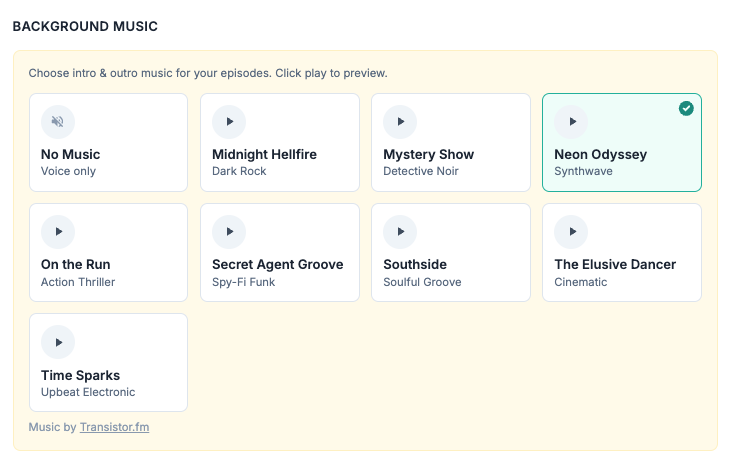
Yes! You can change both your voice and background music as often as you like. Just update your preferences on the dashboard and save. The change takes effect on your very next episode.
On your dashboard, find the "Delivery Time" setting and pick the hour that works best for you. Some people like it first thing in the morning; others prefer it for their afternoon break or evening commute. FlashBrief delivers on the hour (7:00, 8:00, etc.), any hour you choose. This delivery time applies to all your scheduled days — whichever topic is assigned to that day will be generated and delivered at the time you've set.
During the setup wizard, FlashBrief automatically detects your timezone from your browser. You can also set it manually from the dashboard if the auto-detected timezone isn't right — for example, if you're traveling or using a VPN.
Yes, anytime. Update the time on your dashboard and save. The change takes effect starting with your next scheduled episode. If you change it after today's episode has already been generated, the new time will apply tomorrow.
That depends on your plan:
- Free trial: Every day for 5 days.
- Lite plan ($3.49/month): Twice a week — you choose 2 days.
- Standard plan ($6.49/month): Four times a week — you choose 4 days.
- Premium plan ($10.99/month): Every day, 7 days a week.
Each delivery day plays the topic you've assigned to that day. For example, a Standard user might hear AI news on Monday, Climate updates on Tuesday, and Space exploration on Thursday — whatever they've set up in their topic schedule. If you have just one topic, every delivery day covers that same topic.
FlashBrief offers four tiers:
- Free Trial: 5 episodes. Up to 7 topics. No credit card required.
- Lite — $3.49/month or $35/year: 2 episodes per week. Up to 2 topics. Choose your active days.
- Standard — $6.49/month or $65/year: 4 episodes per week. Up to 4 topics. Choose your active days.
- Premium — $10.99/month or $110/year: Daily episodes, 7 days a week. Up to 7 topics — design your entire week.
Yearly plans save about 16% compared to monthly. All paid plans include the same features — voice selection, background music, email transcripts, and full access to your podcast feed. The differences are how often you receive episodes and how many topics you can assign across your week.
After your 5 free episodes, your account stays active but no new episodes will be generated. You'll still have access to your existing episodes in your podcast app. You won't be charged anything — we'll simply invite you to upgrade if you'd like to keep receiving briefings.
From your dashboard, click the "Upgrade" button. You'll see a comparison of the Lite, Standard, and Premium plans. Choose the one you want, and you'll be taken to a secure Stripe checkout page to enter your payment details. Your upgraded episodes start with the next scheduled delivery.
If you're already on a paid plan and want to switch (say, from Lite to Standard, or Premium to Standard), go to your dashboard and look for the subscription management section. You can upgrade or downgrade, and billing is prorated — meaning you only pay the difference for the rest of the current billing cycle.
You can cancel anytime from your dashboard. When you cancel, your subscription remains active until the end of your current billing period — you won't lose access immediately. After that, your account reverts to a free account (no new episodes, but existing episodes remain in your podcast feed).
All payments are processed securely through Stripe, a leading payment processor trusted by millions of businesses. We never see or store your credit card details — that's all handled directly by Stripe. You can manage your payment method, view invoices, and update your billing info through the payment portal accessible from your dashboard.
All plans include a 7-day money-back guarantee. If you're not happy with FlashBrief within 7 days of your first payment, contact us at hello@flashbrief.app for a full refund — no questions asked.
After 7 days, here's how cancellation works:
- Monthly plans: Cancel anytime. Your subscription stays active until the end of your billing period — no partial-month refund, but you keep full access until then.
- Annual plans: Cancel anytime. You'll receive a prorated refund for the unused months remaining on your plan.
Go to your dashboard and look for the email change option in your account settings. You'll enter your new email address, and we'll send a verification code to that new address. Enter the code, and your email is updated. We'll also send a notification to your old email address to let you know the change was made — just in case.
If you're logged in, you can change your password from your account settings. If you've forgotten your password, click "Forgot Password?" on the sign-in page, and we'll send you a verification code to reset it.
Yes! On your dashboard under Options, there's an "Include my name in episode greetings" checkbox. When enabled, your FlashBrief host will greet you by name at the start of each episode. Turn it off if you prefer a more generic opening.
On your dashboard, you'll find an "Email Transcripts" toggle. Turn it on to receive an email with the full transcript and source links every time a new episode is generated. Turn it off if you prefer to just listen in your podcast app.
Note: Some important account emails — like your welcome email, trial transition notifications, and your final trial episode — will always include the transcript regardless of this setting.
To delete your account and all associated data, email us at privacy@flashbrief.app with the subject "Deletion Request." We'll process your request and confirm once it's complete. Per our privacy policy, your account data is deleted within 90 days, and audio files and transcripts are deleted immediately.
Every time we generate an episode for you, we search across hundreds of news sources — including outlets like Reuters, BBC, AP, CNN, and regional publications from around the world. We use a combination of news discovery tools that scan Google News and other aggregators to find the most relevant and recent articles on your topic. Then we pull the full text of those articles so your briefing is based on complete reporting, not just headlines.
An AI reads all the articles we found and writes an original news anchor script from scratch. It doesn't just stitch together quotes or summaries — it synthesizes the information into a coherent, professional briefing. The AI identifies 3 to 5 distinct stories, gives roughly equal coverage to each, and if a story was covered in yesterday's episode, it treats it as a developing story ("As we reported recently...") rather than repeating itself. The goal is to sound like a knowledgeable, friendly news anchor who's prepared a briefing just for you.
The script is read aloud by a high-quality AI voice (the one you chose in your settings). This isn't robotic text-to-speech — these are natural-sounding voices with appropriate emphasis and pacing. After the voice narration is generated, we mix in your selected background music at a subtle level, and the final episode is uploaded to your personal podcast feed.
No — every briefing is generated individually for each user. Even if two people choose the same topic, their episodes won't be identical because they're generated at different times with the latest available news, and may have different previous-episode context. Your briefing is genuinely yours.
Yes. FlashBrief uses bank-level encryption for all data in transit and at rest. Your account is protected by secure authentication, and we follow strict access controls internally. For the full technical details, see our Privacy Policy.
No. We do not sell, rent, or share your personal information with third parties for marketing purposes. The only third parties that process your data are our infrastructure providers (like AWS for hosting and Stripe for payments), and they're contractually bound to protect it. See Section 6 of our Privacy Policy for the complete list.
Absolutely. Email privacy@flashbrief.app with the subject "Deletion Request." Your account data is deleted within 90 days, and your audio files and transcripts are deleted immediately. Payment records are retained only as required by law. See our Privacy Policy for full details on data retention.
You have the right to access, correct, delete, or export your data at any time. You can also object to certain types of processing. These rights are protected under GDPR and other data protection laws. For a plain-English summary, see the rights summary table in our Privacy Policy.
First, check your plan limits — free trial users get 5 episodes, Lite gets 2/week, Standard gets 4/week, and Premium gets daily. If you're within your limits: check your email, because if something went wrong during generation, we send a notification explaining what happened. These errors are rare and usually resolve by the next day. If you didn't get an email either, drop us a line at hello@flashbrief.app.
This usually means your first episode hasn't finished generating yet (it takes about 10 minutes after setup), or the podcast link wasn't pasted correctly. Double-check by copying the link fresh from your dashboard and re-adding it. Also try pulling down to refresh in your podcast app. If the problem persists, email us and we'll check your feed.
Try the "Forgot Password?" link on the sign-in page to reset your password. If you're not receiving the reset code email, check your spam folder. If you're still stuck, email hello@flashbrief.app and we'll help you regain access.
Sometimes episode generation hits a temporary snag — maybe a news source was briefly unavailable, or there was a processing hiccup. The error email will tell you which step had trouble and offer tips. In most cases, your next episode will generate normally. If you're getting error emails repeatedly, let us know at hello@flashbrief.app.
If the voice doesn't match what you selected, check your Voice setting on the dashboard — it may not have saved. If the episode seems to cover the wrong topic, check your topic schedule — make sure the right topic is assigned to today's day of the week. Changes only take effect on the next episode, not retroactively. If something else sounds off, email us with details and we'll look into it.
Email us at hello@flashbrief.app. We're a small team and we genuinely read every message. We aim to respond within 24 hours on business days.